Internet Access: Difference between revisions
Jump to navigation
Jump to search
>Wongck No edit summary |
>Wongck No edit summary |
||
| Line 1: | Line 1: | ||
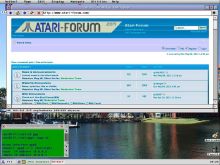
[[Image:GEMDesktop.jpg|220px|right|Internet_Access]] | [[Image:GEMDesktop.jpg|220px|right|Internet_Access]] | ||
If you thought accessing the internet on your Atari was impossible - think again! The following tutorials will help you out. | If you thought accessing the internet on your Atari was impossible - think again! The following tutorials will help you out. | ||
You need at least one of these [[Add-on_hardware#Networking|networking hardware]] for your Atari. | |||
* Generic [[Sting Setup]] | * Generic [[Sting Setup]] | ||
Revision as of 08:45, 4 December 2011

If you thought accessing the internet on your Atari was impossible - think again! The following tutorials will help you out.
You need at least one of these networking hardware for your Atari.
- Generic Sting Setup
- Internet access Via Falcon & Null Modem cable with a Linux machine
- Falcon to Wireless Internet! (using serial null modem and PC with USB - includes file transfer)
- Falcon to Internet using Serial Null modem and PC with USB - includes file transfer
- Generic Atari networking with Internet Connection Sharing & Windows-Atari network interoperability
- Mint Networking manual installation
- Setting up PPP on Windows 7 and sharing it with your Atari
Back to Main_Page